
Easy Selection
15.42€
A visual selection tool for multi-instance fixtures on grandMA3. Navigate fixture structures through a tree-view, view DMX channel assignments, and automate complex selection commands directly from a dedicated interface.
Take full control of complex fixtures with ease!
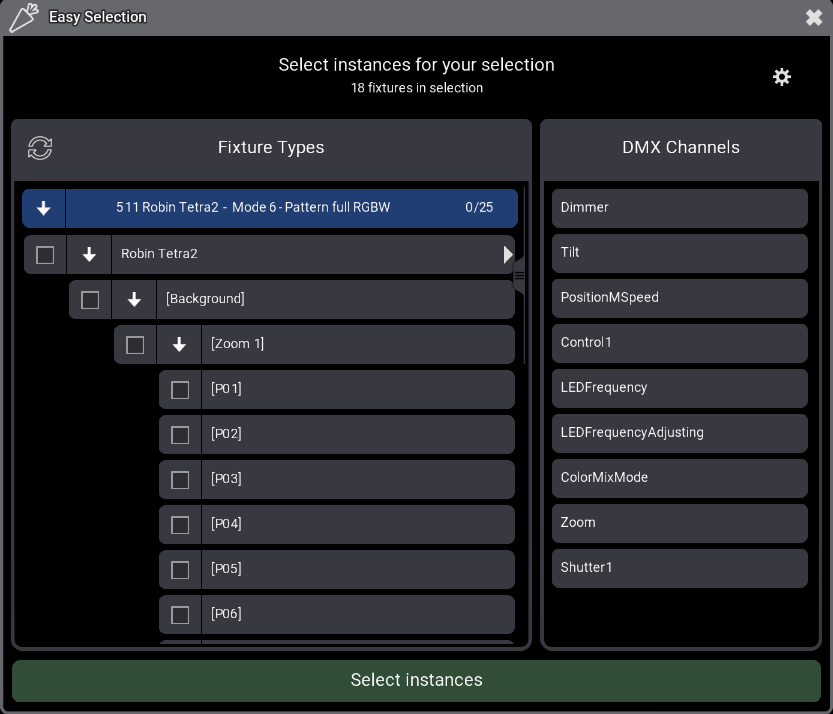
Easy Selection is a visual selection tool for multi-instance fixtures. Stop digging in the command line to build the command that select pixels for a range of fixtures. This plugin analyzes your selection and provides a visual, hierarchical interface to select exactly what you need.
✨ Why you need this plugin:
- Time Saver: Stop typing endless command lines like “
Fixture 101 Thru 142.2.1 Thru 12” The plugin handles the syntax for you in a single click. A must-have tool for creating your linear groups. - Visual Clarity: See the real structure of your Fixture Type (Master, Patterns, Pixels) in a logical tree view.
- Instance content: View the DMX channels for each instance directly in the UI, eliminating guesswork during programming.
- Smart Selection: You can either select an instance itself or all the children only
⚡ Key features:
- Auto-Detection: Simply select the fixtures you want to work with and run the plugin; it instantly identifies all involved Fixture Types.
- Grouping friendly: If a grouping fixture is selected, the plugin retrieve fixtures inside it
- Multi-IDType Support: Full compatibility with all ID types (Fixture, Channel, HouseLight, Media, NonDim, etc.).
- Intuitive Interface:
- Clean hierarchical display with indentation for perfect readability.
- Checkboxes to prepare your selection visually.
- Click an instance to see what DMX Channel are in it.
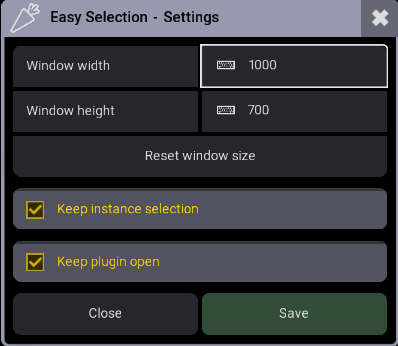
- Settings Menu:
- Adjust window size to fit your use.
- “Keep instance selection” if not checked, the plugin uncheck instance checkboxes after a selection.
- “Keep plugin open” to perform multiple selections without restarting the plugin.
❓ How to use it?
- Select fixtures
- Run the “Easy Selection” plugin
- Navigate the hierarchy in the UI and check the instances you wish to select.
- Click the “Select instances” button.
- The plugin will clear your current selection and apply the new selection.
- To change fixtures, select new fixtures and click update button in the “Fixture Types” header to refresh the instance list with your new selection
- Repeat as needed.
🎞️ Watch the video
🎫 Licensing
This plugin require a licence activation key sent by email.
⬆️ Updates
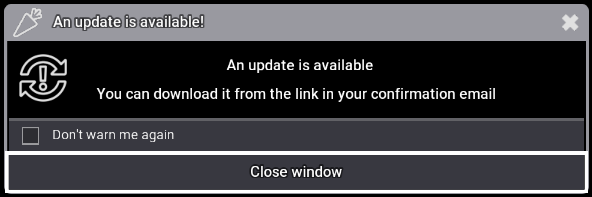
When running on onPC the plugin will check if updates are available and notify you if there are any:
🔧 Uninstall and Cleanup
You can uninstall the plugin with the following command, this will delete all plugin data and licence:
Plugin "Easy Selection" "Uninstall"If you just need to delete plugin data without unregister the plugin:
Plugin "Easy Selection" "Cleanup"Version changelog
- 1.2.0.1
- Changed: The uninstall and cleanup functions no longer restarts the plugin
- 1.2.0.0
- Added: Compatibility with Lua 5.5
- Added: By default, all instances are unchecked once a selection is made, this can be change in the settings window
- Added: Cleanup and uninstall functions
- Changed: Fixtures libraries are now exported to the temp folder
- Fixed: Settings windows can now be open only once
- Fixed: Progress Bars not stopped on crash
- 1.1.0.0
- Added: Button in the “Fixture Types” header, to update the fixture selection without restarting the plugin
- Added: Undo support on selection command, so the selections are now Oopsable
- 1.0.0.1
- Fixed: Groups above location 4242 are moved by -1 upon plugin launch
- 1.0.0.0
- Initial release
Tested Ma versions
- 2.5.0.3
- 2.4.2.2
- 2.3.2.0
15.42€
You may also like…